Food Scanner Apps for Parents: 7 Checks Before You Trust a Grade
Ask a chatbot twice and you can get two answers, with no sources. Seven checks that work for any app, and SnackProof's own answers, limits included.
A food scanner app turns a crowded ingredient list into one grade while you're holding a toddler and a shopping cart. That only helps if the grade deserves your trust. Before you rely on one, run seven checks: is the grade reproducible, is it sourced, does it explain each flag, does it account for kids, is it honest about its limits, what happens to your photo, and is the pricing clear? You don't need any technical knowledge, and the checks work on any app.
We make SnackProof, a food-additive scanner for parents that's launching soon, so we have a stake here. The last section answers the same seven questions about our own app, limits included. New to labels? Start with how to read food labels for kids.
Why grades vary between food scanner apps
Scan the same box of fruit snacks with two apps and you may get two different letters. That doesn't mean one is broken. Apps differ in:
- What they grade: additives, nutrition (sugar, salt, calories), or both.
- Which rulebook they use: US and EU rules differ, and both keep changing.
- Who they grade for: a toddler setting may weigh some additives more heavily.
- Who decides: some apps let a general AI chatbot write a safety opinion from your photo. Others use AI only to read the text, then apply fixed rules.
That last one matters most, because language models aren't fully repeatable. OpenAI's own guide to reproducible outputs says that even with identical settings there is “a small chance that responses differ.” That's fine for a birthday poem. It isn't fine for a grade that decides what goes in a lunchbox.
Barcode lookups have a caveat too. Open Food Facts, a large open crowdsourced database (SnackProof's barcode mode uses it as well), says in its terms of use that it does not guarantee the accuracy of its data. A barcode result is a shortcut, not the final word.
Checks 1–2: is the grade reproducible, and is it sourced?
1. Same ingredient list, same grade
Scan the same product twice. If the letter jumps around, find out why. Photo reading can vary slightly with glare or a crease, so the fair test is the same ingredient list with the same settings. An app that shows the list it read lets you tell a new reading from a new rule. If the app says only that its AI analyzes the product, with no word on rules or sources, ask whether the grade is written fresh each time.
2. Every rule traces back to a source
A trustworthy food additive app can say where each rule comes from: a regulator, a scientific panel or a law. “Linked to health concerns” with no source is a warning sign. Dates matter too. On April 22, 2025, the FDA announced a plan to phase out petroleum-based synthetic dyes, including Red 40 and Yellow 5. Look for a “last updated” date. Our Red 40 explainer shows how much can change for a single dye.
Checks 3–4: does it explain each flag, and does it account for kids?
3. Tap a flag and get a reason
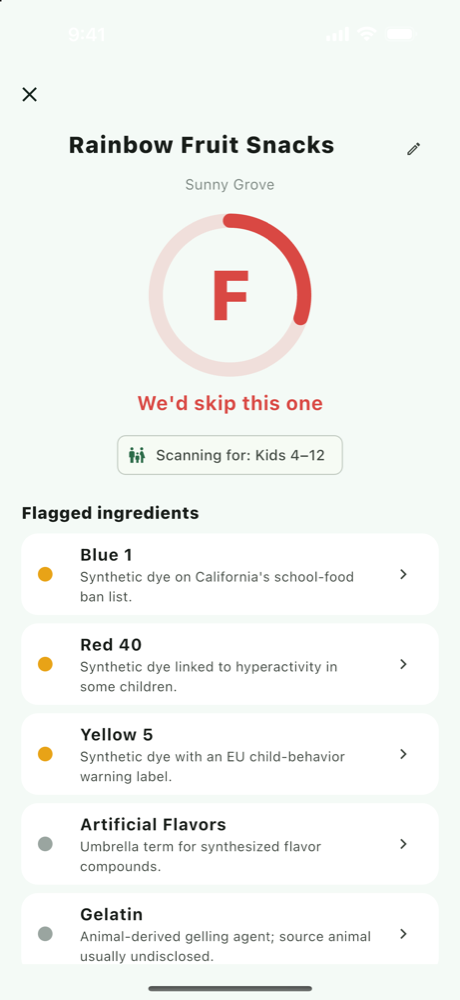
A grade alone is an answer with no working shown. Tap a flagged ingredient: you should see what it is, why it was flagged, how serious it is, and its other names (Red 40 is also printed as FD&C Red No. 40, Allura Red AC or E129). Without that, you can't tell a real concern from a false match.
4. It knows who's eating
Some rules are written with children in mind. EU law requires foods containing six particular colours to be labelled “may have an adverse effect on activity and attention in children” (Regulation (EC) No 1333/2008, Annex V). A food scanner app for parents should let you say who you're scanning for, and show which setting each result used.

Check 5: is it honest about its limits?
Every ingredient scanner app has blind spots. A good one names them up front:
- Languages:an English-only app should say so, and tell you when it can't read a label rather than guess.
- What the grade measures: an additive grade ignores sugar and calories, and a nutrition score says little about dyes.
- Connection: reading a photo usually happens in the cloud.
- Allergens:repeating the label's “Contains” line isn't allergen detection.
Allergies
An app can repeat the allergen statement printed on the pack, but recipes and labels change. Confirm against the physical label and your allergist; never rely on an app alone.
Checks 6–7: what happens to your photo, and is the pricing clear?
6. Your photo, your data
The privacy policy should say where the photo goes, whether it's stored or used to train AI, whether you need an account, and how to delete your data. If a cloud AI reads the label, its provider's rules matter too. OpenAI's API data controls, for example, say API data isn't used for training unless the developer opts in, and set out how long abuse-monitoring logs are kept. A good app names its provider.
7. Know the price before the paywall
You should see the price before you're asked to pay: how many free scans you get, whether a trial covers every plan and who qualifies, what the paid tier adds (“unlimited scans” is clear; “premium insights” isn't), and whether the free tier shows ads.
LLM-judged vs rules-based food scanner app design
Broadly, there are two ways to build one, and they fail in different ways.
| Question | LLM-judged design | Rules-based design (AI reads, rules decide) |
|---|---|---|
| Who decides the grade? | A language model writes a judgement for each scan | Fixed rules, applied to the ingredient list the AI transcribed |
| Same ingredient list twice | Can differ between attempts | Same list and settings give the same grade |
| Where claims come from | Often unsourced; depends on the prompt and the model | A reviewable database that can cite a source per rule |
| Explaining a flag | Fluent text that can sound confident when it is wrong | The specific rule, its severity and its source |
| Unfamiliar ingredients | Will offer an opinion on almost anything | Can miss anything its database doesn’t cover |
| Keeping current | Depends on the model and its training data | Changes only when the database is updated |
The trade-off: a rules-based app is only as complete as its database. An LLM-judged app covers more ground, but it can't promise the same answer twice or show where the answer came from.
SnackProof as the worked example, launching soon
SnackProof uses the rules-based design: the AI reads the label, and it never judges. The home page explains how SnackProof separates reading from judging. It's coming soon to iOS and Android, and here are its answers to the seven checks, shortfalls included.
- ReproducibleA fixed rules engine computes the grade on your phone: the same ingredient list and settings always give the same verdict. Photo reading can vary slightly, so the verdict lists every ingredient it read.
- SourcedA human-reviewed database of 168 additives, updated August 28, 2026, citing the FDA, EFSA, California law and more. Updates arrive with app updates.
- ExplainedEach flag opens to a plain-English summary, regulatory chips such as “EU warning label”, other names and sources. Every verdict has a “Report an incorrect result” button.
- Kid-awarePick Toddler (0–3), Kids (4–12), Whole family or Just me. Kid-sensitive additives count for more for toddlers and kids. Personalization is free.
- Honest limitsEnglish labels only. It shows the label’s allergen statement but doesn’t detect allergens. It grades additives, not nutrition, and needs a connection to read a new label.
- Your photoLabel photos go to the OpenAI API to extract the text; SnackProof never writes them to storage or uses them for training, and OpenAI’s API data controls apply. A barcode match on Open Food Facts sends no photo. No account, and Delete my data in Settings erases your history and anonymous ID.
- Pricing3 free scans with no account, then Pro at $29.99 a year or $6.99 a month; the 3-day free trial is annual-only, for eligible new subscribers. Pro adds unlimited scans and removes ads. The free tier shows a banner ad. Prices may vary by region.
Whichever app you choose, keep the checklist, and still glance at the label now and then. Our 60-second label routine helps.
Frequently asked questions
Are food scanner apps accurate?
It depends on two steps: reading the label and the rules behind the grade. Test an app on a product you know, compare the ingredient list it shows with the pack, and tap a flag to see whether it gives a reason and a source.
Why do two food scanner apps give the same snack different grades?
They may grade different things, use different rulebooks, weigh ingredients differently for children, or have an AI write a fresh judgement each time. Either way, each app should be able to explain its grade.
Can a food scanner app check for my child’s allergies?
Treat any app as a reading aid, not an allergy check, because recipes and labels change. Confirm against the physical label and your allergist; never rely on an app alone.
Is it safe to send a photo of a food label to an AI?
An ingredient panel holds little personal information, but check where the photo goes, whether it is stored or used for training, whether you need an account, and how to delete your data.
Is SnackProof available yet?
Not yet. SnackProof is launching soon on iOS and Android, starting with 3 free scans and no account. The how-it-works section on the home page shows the flow.
Sources
- OpenAI Cookbook: How to make your completions outputs consistent with the seed parameter Accessed September 10, 2026.
- Open Food Facts: Terms of use, contribution and re-use Accessed September 10, 2026.
- FDA: HHS, FDA to Phase Out Petroleum-Based Synthetic Dyes in Nation’s Food Supply (April 22, 2025) Accessed September 10, 2026.
- EUR-Lex: Regulation (EC) No 1333/2008 on food additives, Annex V Accessed September 10, 2026.
- OpenAI API: Data controls in the OpenAI platform Accessed September 10, 2026.
SnackProof provides general ingredient information for educational purposes. It is not medical, nutritional, or religious advice, and may contain errors. Always read the physical label and consult your pediatrician or qualified professional for health decisions.